ECI SIR 2026 Online Enumeration Form: The SIR Enumeration Form is the official document that voter households complete to make fresh enrollments, deletions and corrections of data regarding voters before election time. Election commission requires SIR in-between major elections or where there is necessity, to maintain clean electoral rolls.
The precision and purity in the voter lists required by every election period, and the Election Commission of India (ECI) claims to provide this precaution by Special Intensive Revision (SIR) of the voting lists. SIR exercise is an important move of renewing and confirming the electoral roll, and thus, new voters can be enrolled and the old ones can update their information. The SIR has been digitalized to enable Indian voters to fill and submit a form of ECI SIR 2026 Online Enumeration Form online in an easy and convenient way, which will ensure that the voter is registered in the electoral roll in 2026.
ECI SIR 2026 Online Enumeration Form
The SIR exercise 2026 had begun on November 4, 2025 with a deadline decade later at time extended across most states to approximately December 11, 2025 to submit forms, and the publication of the final electoral rolls after that. Ease and efficiency of completion of the SIR form are achieved when doing it online.
It saves time on the amount of paperwork, assists in preventing mistakes and enables more rapid checking of data by the electoral offices. The process protects the democratic rights of citizens and integrity of elections.
How to fill ECI SIR Enumeration Form Online?
- Open the website hosting the SIR 2026 portal voter services of the Election Commission of India at voters.eci.gov.in or of your state Chief Electoral Officer. Others also include direct links on their CEO portals labelled as the SIR 2026.
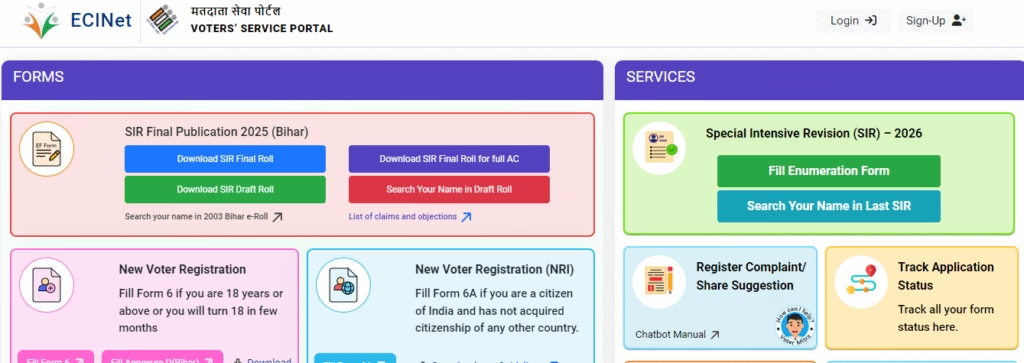
- On the portal home page, identify and press the button of Fill Enumeration Form under the Special Intensive Revision (SIR) -2026 services.
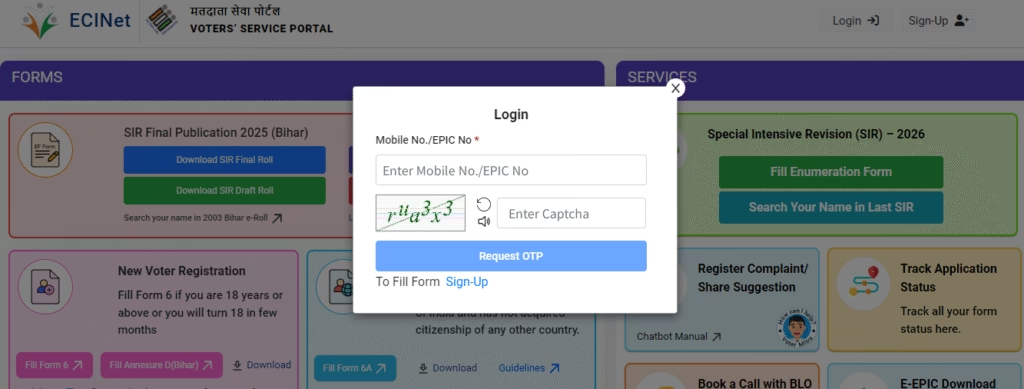
- In case it is the first time you use the site, then you should use the Sign up link. Key in your mobile No and the captcha entering code.
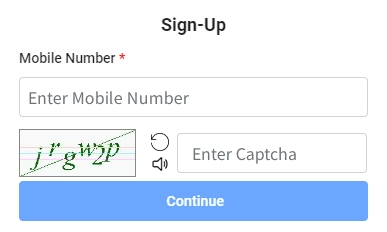
- You will get OTP (One Time Password) about your mobile number. OTP: fill in and sign-up.
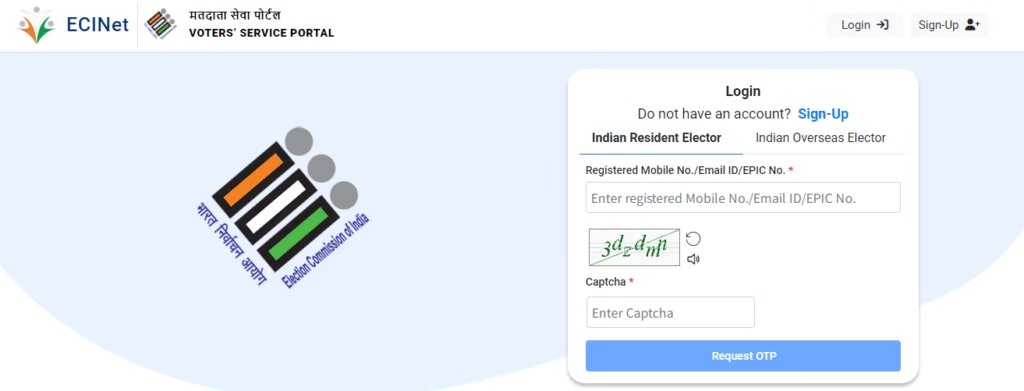
- Use your mobile number and OTP/ password to log in. You have to use your Electoral Photo Identity Code (EPIC) number to verify your identity and submit the form with your registered mobile number.
- Give all the processes necessary including your name, address, and date of birth among other identification information. Provide a picture of yourself as one of the latest. This is not compulsory as having an Aadhaar number is not compulsory.
- Check thoroughly all the information, correct it in case of error before submitting. Follow-up the form using digitization. Status of the post submission online can be traced.
- To have a copy of filled copy, you can download it and print.
This all online approach will help you avoid paperwork and numerous visits to the Electoral registration office or even Booth Level Officers (BLOs). In case of preference, it is also possible to fill in the old paper form and submit it to the BLO during his or her visits.
ECI SIR 2026 Important Dates
- Commencement of SIR Activity: 4th of November, 2025.
- Form Submission Deadline: In most states, this may be extended, but most commonly have a deadline of December 11, 2025.
- Draft Electoral Roll Publication: Mid-December 2025 (e.g. December 16 in most states).
- Claims and Objections Period Roughly, December 9, 2025, to January 8, 2026. Address change during this period may be done by use of Form 8.
- Last Electoral Roll Publication: February 7-February 14, 2026 (in some states is extended to February 14).
Be sure to check the CEO site of your state to be specific in dates and notifications. The initiative by the Election Commission to digitalize the Special Intensive Revision process by providing an online enumeration form that is easy to fill is a significant milestone phase towards ensuring democracy participation is efficient and convenient. With special attention to the above steps, each eligible Indian voter will be able to make sure that his/her name is not left out in the electoral roll during future elections, and this will aid in enhancing the sanctity and inclusiveness of the voting process.
Keep in touch with the site of your state CEO or the official ECI voter services page to get later alerts and support and help become an active participant in the Indian democracy filing your SIR enumeration form online.
How to Check if Your BLO Has Uploaded Your ECI SIR 2026 Enumeration Form?
Step 1: Visit the Website
Open your browser and go to voters.eci.gov.in.
Step 2: Open the ECI SIR 2026 Enumeration Form Page
On the homepage, click on ‘Fill Enumeration Form’. This will open the login or signup page.
Step 3: Sign Up (For New Users)
If you are a new user, click on ‘Sign Up’ and enter your mobile number, optional email address, and captcha to complete the registration.
Step 4: Log In (For Existing Users)
Click on ‘Login’, enter your mobile number and captcha, then select ‘Request OTP’. Enter the OTP and verify to log in.
Step 5: Return to ‘Fill Enumeration Form’
After logging in, your name will appear at the top of the page. Click on ‘Fill Enumeration Form’ once again.
Step 6: Enter Your EPIC Number
Type your EPIC (Voter ID) number into the designated box.
Step 7: Search for Your Form
Click on ‘Search’. The status of your form will appear immediately.
How to Interpret the Status?
Step 1: If the Form Has Been Uploaded
A message will appear stating: “Your form has already been submitted using mobile number XXXXX…” This indicates that your BLO has successfully uploaded it.
Step 2: If the Form Has Not Been Uploaded
In this case, no such message will appear; instead, a new form page may open up.
Step 3: If Something Seems Incorrect
If the displayed mobile number is incorrect, or if the status shows ‘Submitted’ even though you have not submitted the form yourself, contact your local BLO immediately.
FAQ’s on ECI SIR 2026 Enumeration Form
What is the ECI SIR 2026 Enumeration Form?
The ECI SIR (Special Intensive Revision) Enumeration Form is a document issued by the Election Commission of India to update and verify voter details within the electoral rolls. This helps ensure that the voter lists are accurate and up-to-date.
Who needs to fill out this ECI SIR 2026 form?
This form is intended for:
Existing voters undergoing details verification.
New voters wishing to register.
Individuals who wish to correct or update their information.
What information is required in the ECI SIR 2026 Form?
You are generally required to provide the following information:
Full Name.
Age and Date of Birth.
Address.
Family Details.
Voter ID (if already registered).
Supporting Documents (ID proof, Address proof).
What happens after submission?
After submitting the form:
Your details are verified by the officials.
Necessary updates are made to the voter list.
You may receive a confirmation message or updated Voter ID details.
Also Read:-
INI CET 2026 Admit Card for July Session Exam [16 May]
CBSE Result 2026 Class 10th 12th Expected Date, Check Online, via App & SMS
[Choice Filling] How to register for Sainik School E Counselling 2026-27?